Tell your AI assistant what to do, and the record stays in MyWay
Telling Claude Code "take PLT-145" is enough: the task is assigned to you, moves to in progress and a git branch is opened; when the work is done, the assistant writes what it did on the task. Someone who does not use a terminal does the same from the Claude Desktop chat: asks for their tasks, has a document written and starts a review. The assistant does everything with your permissions, and every step shows under your name in the task history and the audit log.
- Claude Code
- Claude Desktop (MCP)
- Codex
- Cursor
- Gemini CLI
- GitHub Copilot
- CI and scripts
- Personal access token
- Read-only token
- Installs on an offline network too
One piece of work with an assistant, end to end
A prototype with Claude Code, a document with Claude Desktop, development with the CLI. Pick a tab or let it play.
From whichever tool you already use
Claude Code
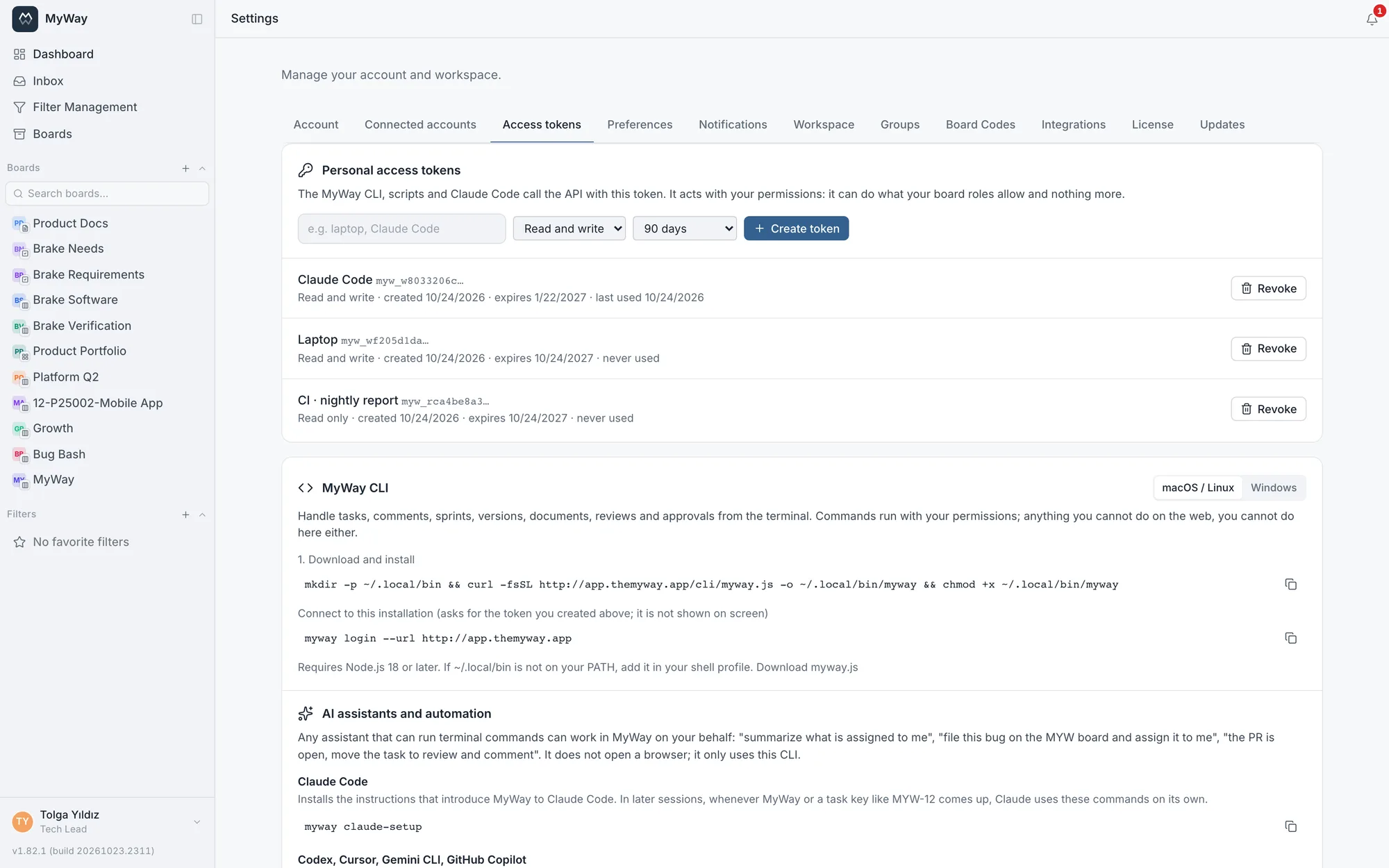
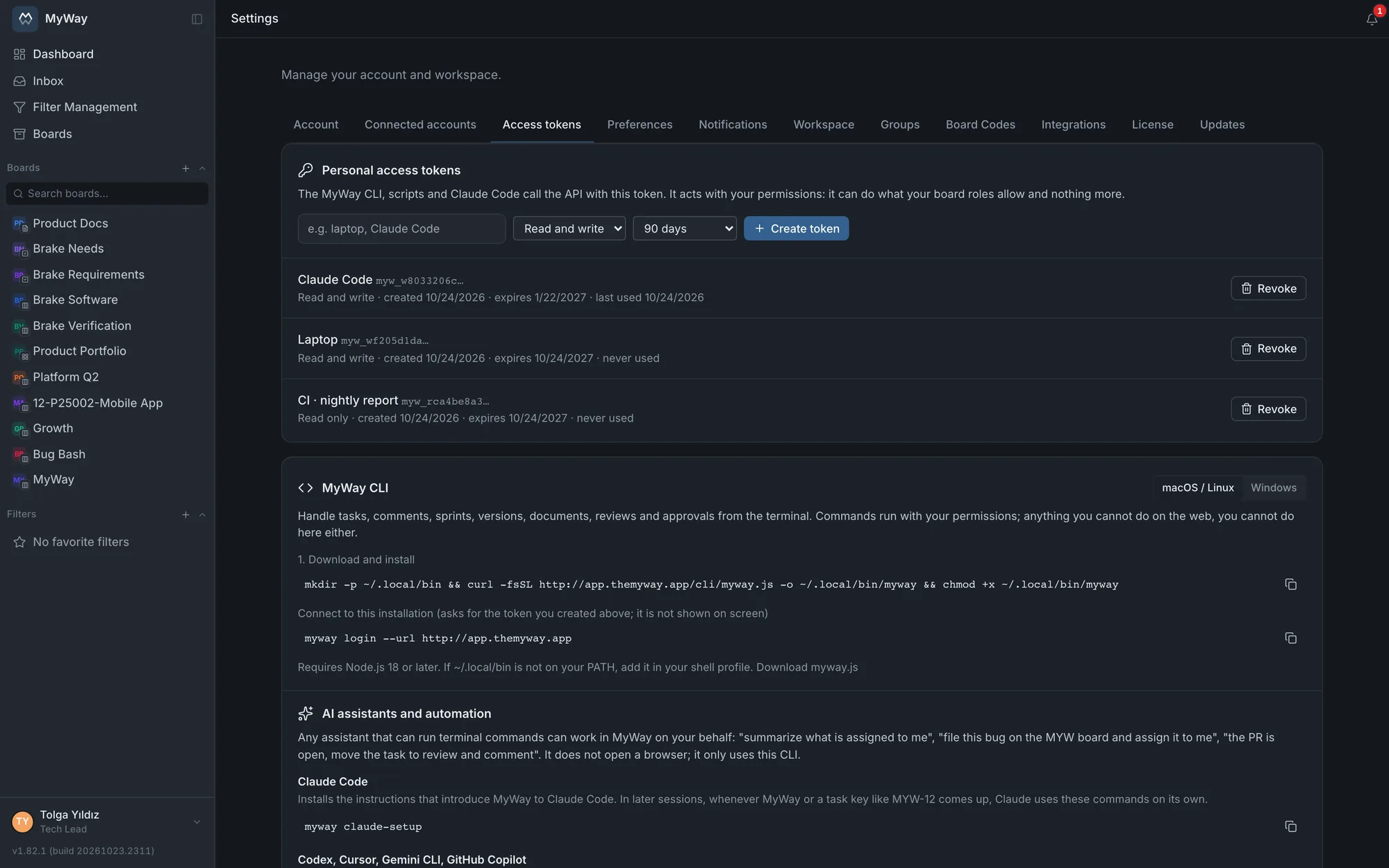
myway claude-setup introduces MyWay to Claude Code as a skill. In later sessions, whenever MyWay or a task key like MYW-12 comes up, Claude uses the right commands on its own: reads the task, takes it, opens the branch, comments and attaches screenshots to the task.
Claude Desktop (MCP)
myway mcp-setup adds MyWay to Claude Desktop as 27 tools. From the chat you say "what is on my plate this sprint", "comment on MYW-12", "create a procedure page under this folder and send it for review". Read tools run without asking, write tools run with your confirmation.
Codex, Cursor, Gemini CLI, Copilot
myway agent-guide --append AGENTS.md adds a MyWay section to the project’s AGENTS.md. Assistants that read that file work with the same commands. Any assistant that can run a terminal command can do work in MyWay on your behalf.
Three steps, a few minutes
- 1
Create a token under Settings > Access tokens: give it a name (say "Claude Code") and pick its scope (read and write, or read-only) and lifetime.
- 2
On the MyWay CLI card on the same screen, pick your operating system and run the install command; the commands come ready with your own server’s address. Then sign in with myway login by pasting the token, which is never shown on screen.
- 3
Connect your assistant: myway claude-setup for Claude Code, myway mcp-setup for Claude Desktop, myway agent-guide --append AGENTS.md for the others.
# sign in once
myway login --url https://myway.company.com

# connect your assistant
myway claude-setup        # Claude Code
myway mcp-setup           # Claude Desktop
myway agent-guide --append AGENTS.md

# or use it yourself
myway start PLT-145       # assign, start, branch
myway comment PLT-145 "Prototype is ready"
The CLI is a single file and every installation serves the CLI of its own version from its own address; it does not depend on an outside registry like npm and installs on an offline network too. It needs Node.js 18 or later. Command names and output are in English.
What the assistant can and cannot do
- Read (no confirmation)
- Who am I, boards, board details, task list, my tasks, task, search, sprint details, inbox, notifications, document tree, document, reviews, approvals
- Write (with your confirmation)
- Create, update, move and assign a task, comment, attach a file, link items; comment on a document, add review feedback; create and update a document; start a review
- Irreversible (asks every time)
- Publish a document
- Deliberately left out
- Deleting tasks and comments, completing a sprint, review and approval decisions (a signature on your behalf), raw API calls. For these you use the CLI in the terminal yourself.
The assistant cannot do more than you can
With your permissions
It works with the token owner’s permissions: it does what your board role allows. Workflow rules, status locks, fill-in rules and rate limits apply just as in the browser.
Every step on record
Everything the assistant does shows under your name in the task history and the audit log. Requests made with a token do not make you show as online.
Cut it off in one click
If it only reads and summarises, give it a read-only token; even if write tools show, the server refuses every write. Revoke the token the moment you change your mind and access stops at once.
It asks first
The instructions given to Claude Code and the other assistants tell them to ask you before hard-to-undo work like deleting, approving or closing a sprint. Claude Desktop asks for your confirmation on writes.
Let the pipeline write to MyWay too
No config file is needed in a pipeline: the address and token are given with the MYWAY_URL and MYWAY_TOKEN environment variables. Every command gives machine-readable output with --json; anything without its own command is called with myway api.
# GitLab CI: comment on the task named in the branch once the deploy succeeds
export MYWAY_URL=https://myway.company.com
export MYWAY_TOKEN=$MYWAY_CI_TOKEN          # a masked CI variable
TASK=$(echo "$CI_COMMIT_REF_NAME" | grep -oE "[A-Z][A-Z0-9]*(-[A-Z][A-Z0-9]*)*-[0-9]+" | head -1)
if [ -n "$TASK" ]; then myway comment "$TASK" "Deployed to staging: $CI_PIPELINE_URL"; fiAbout AI and the CLI
Does my data go to the AI provider?
MyWay itself sends no data to any AI service. If you connect an assistant, the tasks and documents it reads go to that assistant’s provider; that is your choice. If you do not want to use an assistant, there is nothing to set up.
Does it cost extra?
No. The CLI, access tokens and the MCP server are in every installation. The assistant’s own subscription (Claude, for example) is separate.
Does MCP work only with Claude Desktop?
myway mcp-setup writes Claude Desktop’s configuration itself. myway mcp-setup --print prints the entry without touching the file, for adding it by hand to another MCP client. Assistants that use a terminal (Claude Code, Codex, Cursor, Gemini CLI, Copilot) work directly with the CLI and do not need MCP.
Where is the token stored?
In the myway login profile. It is not written to Claude Desktop’s config file; the MCP server reads its identity from the CLI sign-in. A token is valid for 90 days by default; its lifetime and scope are chosen when it is created.
Can the assistant delete something by mistake?
Claude Desktop has no delete tool. Assistants that use a terminal reach every CLI command; the instructions tell them to ask before deleting, but the real limit is the token’s scope and your permissions. Give an assistant that only reads a read-only token.
Connect your assistant to MyWay today
Install MyWay, create an access token and connect your assistant with three commands. Free for up to 10 users.